
The quick guide to implementing integration explains how to quickly get started with using the interface
Finlex's open data interface is a REST API that is based on open standards and is independent of programming languages and platforms. You will need a REST or http client to call the API. You can use an API library or, if making http requests, testing and command line tools such as curl and Postman.
The API description follows the Open API standard. You can view the description in the Finlex open data service using the Swagger UI tool. Swagger UI is available for building and testing the API call service. Swagger UI is provided as part of the open data service. You can use the tools based on the Open API description, for example to generate the client, but that is not necessary for carrying out the integration.
The API description documents the endpoints, the http response codes they return, and the definitions of data formats. The API returns XML documents compliant with the Akoma Ntoso standard. The API only returns documents in the Akoma Ntoso XML format. In some cases, json endpoints are supported. To view the data formats, check the Open API description.
The API description does not include the Akoma Ntoso XML schema, which the API uses to return the XML documents.
The open data service's REST API endpoints can be found in the Open API description on https://opendata.finlex.fi/finlex/avoindata/v1.
If you use the https protocol, call the Finlex open data API using TLS protocol version 1.2 or later. Unencrypted http protocol is not supported. You can call the API without identification or registration.
If you use a client, you should keep in mind that user volumes in Finlex's open data service may be restricted to ensure service availability. If the number of calls is being restricted, the service will return the http error code 429 Too Many Requests.
General information about calling Finlex's open data API:
Send an http GET request to the endpoint:
https://opendata.finlex.fi/finlex/avoindata/v1/akn/fi/act/statute/2024/123/fin%40
Call using a curl command:
curl -X 'GET' \
'https://opendata.finlex.fi/finlex/avoindata/v1/akn/fi/act/statute/2024/123/fin%40' \
-H 'accept: application/xml' -H 'User-Agent: curl'
If the call is successful, it will respond by returning the following Akoma Ntoso XML document:
<akomaNtoso xmlns="http://docs.oasis-open.org/legaldocml/ns/akn/3.0" xmlns:finlex="http://data.finlex.fi/schema/finlex" xmlns:mylly="http://mylly.edita.fi/schema/mylly" xmlns:xsi="http://www.w3.org/2001/XMLSchema-instance"> <act contains="originalVersion" name="main"> <meta> <identification source="#organization_fi.finlex"> <FRBRWork> <FRBRthis value="/akn/fi/act/statute/2024/123/!main"/> <FRBRuri value="/akn/fi/act/statute/2024/123"/> <FRBRalias name="eli" value="http://data.finlex.fi/eli/sd/2024/123/alkup"/> <FRBRdate date="2024-03-22" name="dateIssued"/> <FRBRdate date="2024-03-26" name="datePublished"/> <FRBRauthor as="#role_author" href="#organization_fi.parliament"/> <FRBRcountry value="fi"/> <FRBRsubtype value="statute"/> <FRBRnumber value="123"/> <FRBRprescriptive value="true"/> <FRBRauthoritative value="true"/> </FRBRWork> <FRBRExpression> <FRBRthis value="/akn/fi/act/statute/2024/123/fin@/!main"/> <FRBRuri value="/akn/fi/act/statute/2024/123/fin@"/> <FRBRalias name="eli" value="http://data.finlex.fi/eli/sd/2024/123/alkup/fin"/> <FRBRdate date="2024-03-22" name="dateIssued"/> <FRBRdate date="2024-03-26" name="datePublished"/> <FRBRauthor as="#role_author" href="#organization_fi.parliament"/> <FRBRlanguage language="fin"/> </FRBRExpression> <FRBRManifestation> <FRBRthis value="/akn/fi/act/statute/2024/123/fin@/!main.xml"/> <FRBRuri value="/akn/fi/act/statute/2024/123/fin@.akn"/> <FRBRalias name="eli" value="http://data.finlex.fi/eli/sd/2024/123/alkup/fin/xml"/> <FRBRdate date="2024-09-19" name="dateProduced"/> <FRBRauthor as="#role_editor" href="#organization_fi.finlex"/> <FRBRformat value="xml"/> </FRBRManifestation> </identification> <references source="#organization_fi.finlex"> <original eId="original" href="/akn/fi/act/statute/2024/123/fin@" showAs="123/2024"/> <activeRef eId="activeRef" href="/akn/fi/act/statute/2023/1247" showAs="1247/2023"/> <TLCOrganization eId="organization_fi.finlex" href="/akn/ontology/organization/fi.finlex" showAs="Finlex"/> <TLCOrganization eId="organization_fi.parliament" href="/akn/ontology/organization/fi.parliament" showAs="Eduskunta"/> <TLCRole eId="role_author" href="/akn/ontology/role/author" showAs="Tekijä"/> <TLCRole eId="role_editor" href="/akn/ontology/role/editor" showAs="Toimittaja"/> <TLCConcept eId="concept_statute_type-statute.decree" href="/akn/ontology/concept/statute/type-statute.decree" showAs="Asetus"/> <TLCConcept eId="concept_statute_category-statute.amending-statute" href="/akn/ontology/concept/statute/category-statute.amending-statute" showAs="Muutossäädös"/> </references> <proprietary source="#organization_fi.finlex"> <finlex:typeStatute refersTo="#concept_statute_type-statute.decree"/> <finlex:documentYear>2024</finlex:documentYear> <finlex:legacyFinlexUrl>/fi/laki/alkup/2024/20240123</finlex:legacyFinlexUrl> <finlex:categoryStatute refersTo="#concept_statute_category-statute.amending-statute"/> </proprietary> </meta> <preface> <p> <docNumber>123/2024</docNumber> <docTitle>Työ- ja elinkeinoministeriön asetus Patentti- ja rekisterihallituksen maksullisista suoritteista vuonna 2024 annetun työ- ja elinkeinoministeriön asetuksen muuttamisesta</docTitle> </p> </preface> <body> <hcontainer name="statuteTextWrapper"> <content> <p>Tämä asetus tulee voimaan 1 päivänä huhtikuuta 2024. Asetus on voimassa 31 päivään joulukuuta 2024 saakka.</p> </content> </hcontainer> </body> </act> </akomaNtoso>
Because this endpoint uses the GET http method, you can also make the call by opening the endpoint URL in a browser.
Below is an example of listing the new statutes in the Statute Book of Finland for 2024 in JSON format. The API returns a list of the Book's statutes as XML documents that fit the given search criteria.
The API pages the list with the given page size. This call returns the first page. You can retrieve the next page by changing the page number.
Image of the call parameters in Swagger UI:
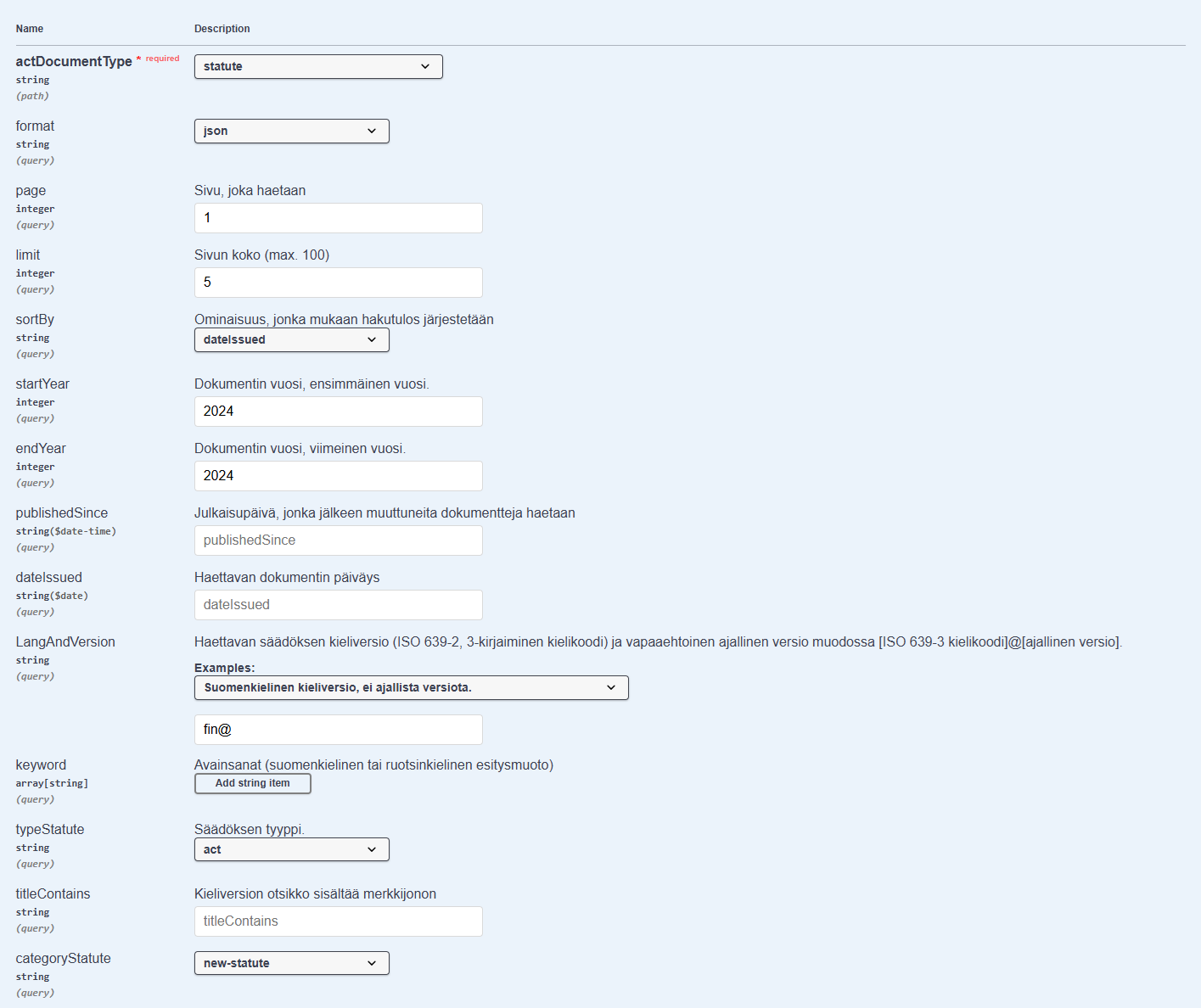
Send an http service request using the GET method to the following URL:
https://opendata.finlex.fi/finlex/avoindata/v1/akn/fi/act/statute/list?format=json&page=1&limit=5&sortBy=dateIssued&startYear=2024&endYear=2024&langAndVersion=fin%40&typeStatute=act&categoryStatute=new-statute
Call using a curl command:
curl -X 'GET' \
'https://opendata.finlex.fi/finlex/avoindata/v1/akn/fi/act/statute/list?format=json&page=1&limit=5&sortBy=dateIssued&startYear=2024&endYear=2024&langAndVersion=fin%40&typeStatute=act&categoryStatute=new-statute' \
-H 'accept: application/xml' -H 'User-Agent: curl'
Example response:
[
  {
    "akn_uri": "https://avoindata.finlex.fi/finlex/avoindata/v1/akn/fi/act/statute/2024/2/fin@",
    "status": null
  },
  {
    "akn_uri": "https://avoindata.finlex.fi/finlex/avoindata/v1/akn/fi/act/statute/2024/18/fin@",
    "status": null
  },
  {
    "akn_uri": "https://avoindata.finlex.fi/finlex/avoindata/v1/akn/fi/act/statute/2024/24/fin@",
    "status": null
  },
  {
    "akn_uri": "https://avoindata.finlex.fi/finlex/avoindata/v1/akn/fi/act/statute/2024/17/fin@",
    "status": null
  },
  {
    "akn_uri": "https://avoindata.finlex.fi/finlex/avoindata/v1/akn/fi/act/statute/2024/124/fin@",
    "status": null
  }
]
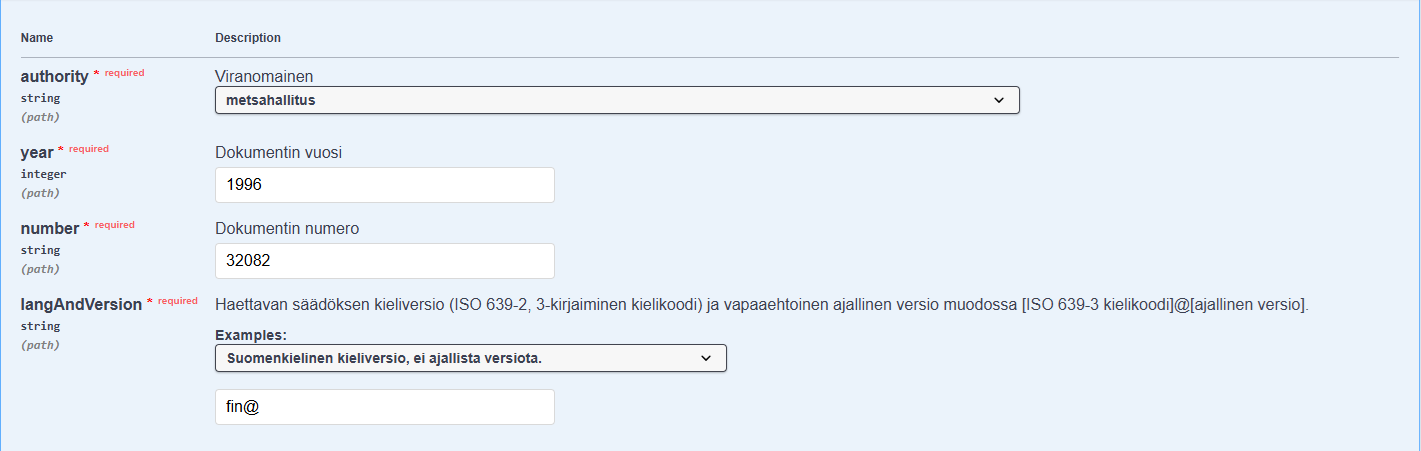
The URL address for making an http service request using the GET method:
https://opendata.finlex.fi/finlex/avoindata/v1/akn/fi/doc/authority-regulation/metsahallitus/1996/32082/fin%40/main.pdf
Call using a curl command:
curl -X 'GET' \
'https://opendata.finlex.fi/finlex/avoindata/v1/akn/fi/doc/authority-regulation/metsahallitus/1996/32082/fin%40/main.pdf' \
-H 'accept: application/pdf' -H 'User-Agent: curl'
Endpoint parameters in Swagger UI:
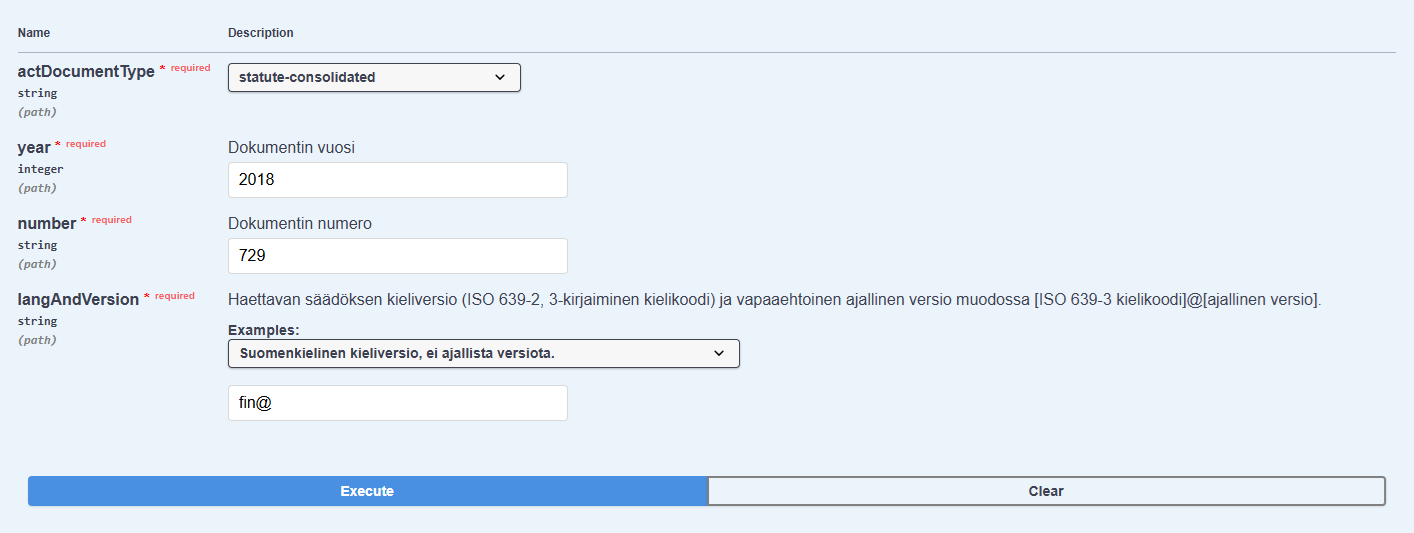
The URL address for making an http service request using the GET method:
https://opendata.finlex.fi/finlex/avoindata/v1/akn/fi/act/statute-consolidated/2018/729/fin%40/main.akn
Call using a curl command:
curl -X 'GET' \
'https://opendata.finlex.fi/finlex/avoindata/v1/akn/fi/act/statute-consolidated/2018/729/fin%40/main.akn' \
-H 'accept: application/zip' -H 'User-Agent: curl'
To retrieve images from Akoma Ntoso documents, follow the link that works with the HATEOAS (Hypermedia as the Engine of Application State) principle.
URL address for making an http service request using the GET method:
https://opendata.finlex.fi/finlex/avoindata/v1/akn/fi/act/statute-consolidated/2018/729/fin%40/media/7296.gif
Call using a curl command:
curl -X 'GET' \
'https://opendata.finlex.fi/finlex/avoindata/v1/akn/fi/act/statute-consolidated/2018/729/fin%40/media/7296.gif' \
-H 'accept: image/gif' -H 'User-Agent: curl'
The call will return an individual gif image from the Road Traffic Act. Follow the link in the Akoma Ntoso document to access the image. To view the retrieved Akoma Ntoso document, see the previous example.